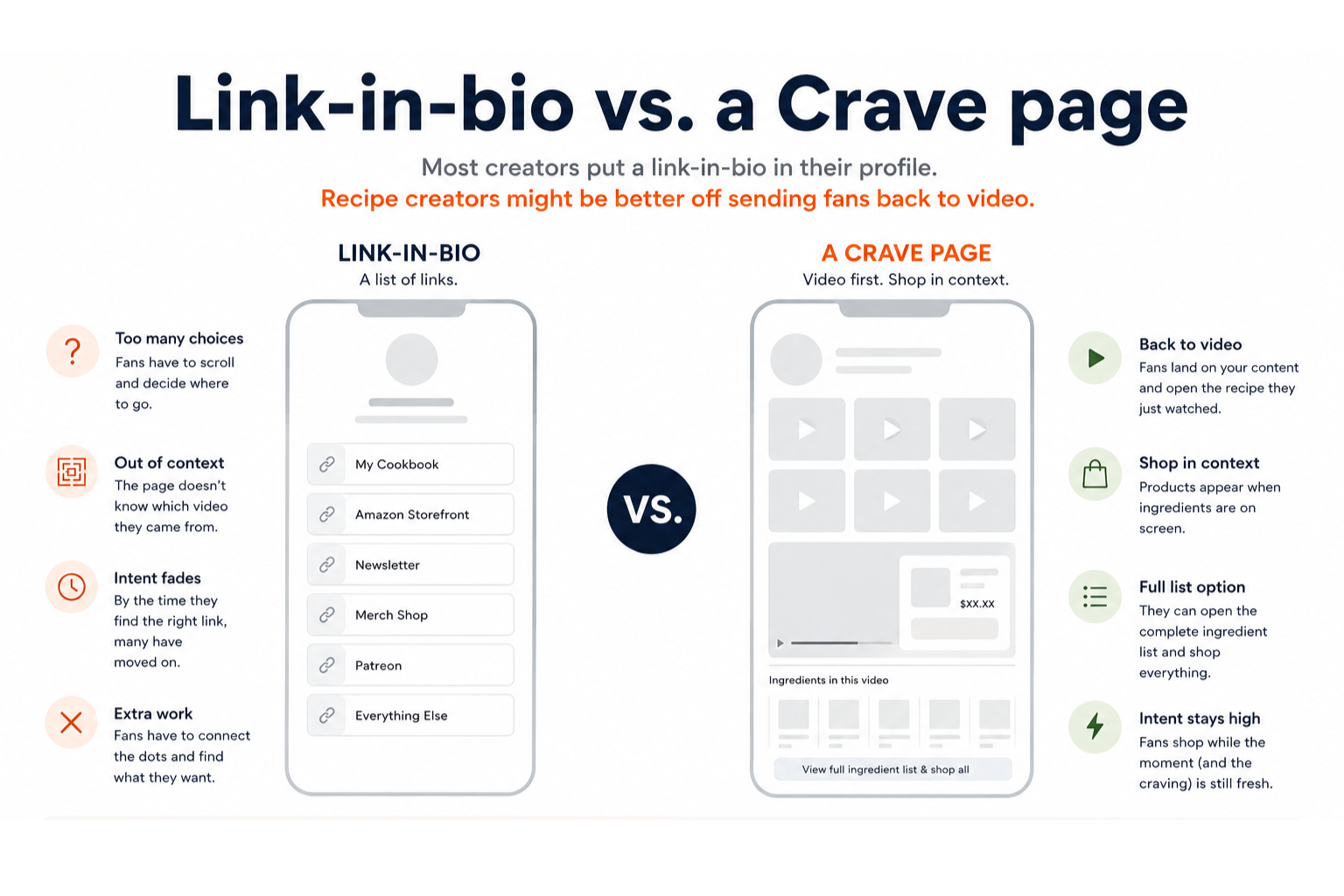
A link-in-bio page is a list of links. Your cookbook, your Amazon storefront, your newsletter, maybe a merch shop. Fans tap your bio, scroll, and pick where to go next. For a lot of creators, that works fine.
Recipe content is a little different. When someone taps your link, they usually just watched you cook something. They remember the dish. They might want the ingredients or the pan you used. Their attention is still on that video.
A link page pulls them out of that moment. Now they're reading buttons, scrolling past links that have nothing to do with what they watched, and trying to figure out which one matches the recipe they already closed. Intent drops fast.
What link-in-bio is for
Link-in-bio tools are built to hold a lot of things at once. One URL for every offer you have. Easy to set up, easy to update, works on any platform.
If your audience might want your podcast, your shop, and your email list all from the same place, a link page makes sense.
Where fans get lost
Recipe fans often show up with one question: what was in that video, and where do I get it?
A static link page doesn't know which video they came from. Your latest Reel and last month's pasta post both send people to the same list. Affiliate links for ingredients sit next to merch, Patreon, and everything else you're promoting. The fan has to do the work of connecting the dots.
By the time they find the right link, a lot of them have moved on.
Why video keeps intent high
A Crave page at crave.food/yourname sends fans back to your content first. They land on a profile that looks like your Reels or TikTok grid, open the recipe they just watched, and shop from there.
The video is still running. Products show up when the ingredient is on screen. If they want to browse everything, they can open the full list for that recipe. Either way, they're shopping in the context of what they came to see.
That matters because intent is highest right after someone watches you cook. They saw the product. They want it. The longer you make them hunt through unrelated links, the more of that energy you lose.
What to put in your bio
If recipe video is a big part of how you grow and earn, your bio link should get fans back into that content. A Crave page does that. A link-in-bio page sends them somewhere else.
You can still use a link-in-bio page for other things. Pinned comments, YouTube descriptions, or a second link on platforms that allow it. But for traffic coming straight from a recipe video, sending people back to video keeps them closer to buying.
Try the demo
We have a public demo you can walk through yourself. Profile grid, timed product pops, ingredient list, shop links. No signup needed.
Crave is in early access. Join the waitlist if you want a page for your channel.